為你的 Java Spring Boot 應用程式新增驗證 (Authentication)
本指南將帶你將 Logto 整合進你的 Java Spring Boot 應用程式。
- 你可以在我們的 spring-boot-sample GitHub 儲存庫找到本指南的範例程式碼。
- 整合 Logto 到 Java Spring Boot 應用程式不需要官方 SDK。我們將使用 Spring Security 和 Spring Security OAuth2 套件來處理與 Logto 的 OIDC 驗證流程。
先決條件
- 一個 Logto Cloud 帳號或 自行架設 Logto。
- 我們的範例程式碼是使用 Spring Boot 的 securing web starter 建立的。如果你還沒有專案,請依照官方指引建立新的網頁應用程式。
- 本指南將使用 Spring Security 和 Spring Security OAuth2 套件來處理與 Logto 的 OIDC 驗證流程。請務必閱讀官方文件以瞭解相關概念。
設定你的 Java Spring Boot 應用程式
新增相依套件
對於 gradle 使用者,請在 build.gradle 檔案中加入以下相依套件:
dependencies {
  implementation 'org.springframework.boot:spring-boot-starter-thymeleaf'
	implementation 'org.springframework.boot:spring-boot-starter-web'
  implementation 'org.springframework.boot:spring-boot-starter-security'
	implementation 'org.springframework.boot:spring-boot-starter-oauth2-client'
}
對於 maven 使用者,請在 pom.xml 檔案中加入以下相依套件:
<dependency>
  <groupId>org.springframework.boot</groupId>
  <artifactId>spring-boot-starter-thymeleaf</artifactId>
</dependency>
<dependency>
  <groupId>org.springframework.boot</groupId>
  <artifactId>spring-boot-starter-web</artifactId>
</dependency>
<dependency>
  <groupId>org.springframework.boot</groupId>
  <artifactId>spring-boot-starter-security</artifactId>
</dependency>
<dependency>
  <groupId>org.springframework.boot</groupId>
  <artifactId>spring-boot-starter-oauth2-client</artifactId>
</dependency>
OAuth2 Client 設定
在 Logto Console 註冊一個新的 Java Spring Boot 應用程式,並取得你的 Web 應用程式所需的 client credential 與 IdP 設定。
將以下設定加入你的 application.properties 檔案:
spring.security.oauth2.client.registration.logto.client-name=logto
spring.security.oauth2.client.registration.logto.client-id={{YOUR_CLIENT_ID}}
spring.security.oauth2.client.registration.logto.client-secret={{YOUR_CLIENT_ID}}
spring.security.oauth2.client.registration.logto.redirect-uri={baseUrl}/login/oauth2/code/{registrationId}
spring.security.oauth2.client.registration.logto.authorization-grant-type=authorization_code
spring.security.oauth2.client.registration.logto.scope=openid,profile,offline_access
spring.security.oauth2.client.registration.logto.provider=logto

spring.security.oauth2.client.provider.logto.issuer-uri={{LOGTO_ENDPOINT}}/oidc
spring.security.oauth2.client.provider.logto.authorization-uri={{LOGTO_ENDPOINT}}/oidc/auth
spring.security.oauth2.client.provider.logto.jwk-set-uri={{LOGTO_ENDPOINT}}/oidc/jwks
實作流程
在進入細節之前,這裡先快速說明一下終端使用者的體驗。登入流程可簡化如下:
- 你的應用程式呼叫登入方法。
- 使用者被重新導向至 Logto 登入頁面。對於原生應用程式,會開啟系統瀏覽器。
- 使用者登入後,會被重新導向回你的應用程式(設定為 redirect URI)。
關於基於重導的登入
- 此驗證流程遵循 OpenID Connect (OIDC) 協議,Logto 強制執行嚴格的安全措施以保護使用者登入。
- 如果你有多個應用程式,可以使用相同的身分提供者 (IdP, Identity provider)(Logto)。一旦使用者登入其中一個應用程式,Logto 將在使用者訪問另一個應用程式時自動完成登入流程。
欲了解更多關於基於重導登入的原理和優勢,請參閱 Logto 登入體驗解析。
為了讓使用者登入後能被導回你的應用程式,你需要在前述步驟中透過 client.registration.logto.redirect-uri 屬性設定 redirect URI。
配置重定向 URI
切換到 Logto Console 的應用程式詳細資訊頁面。新增一個重定向 URI http://localhost:8080/login/oauth2/code/logto。
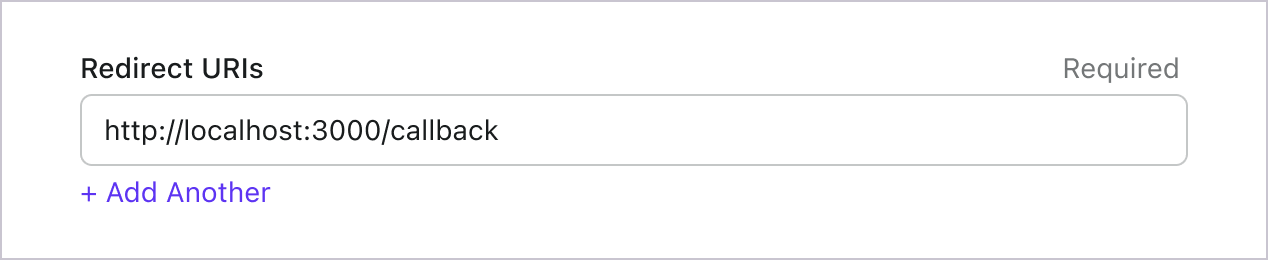
就像登入一樣,使用者應被重定向到 Logto 以登出共享會話。完成後,將使用者重定向回你的網站會很不錯。例如,將 http://localhost:3000/ 新增為登出後重定向 URI 區段。
然後點擊「儲存」以保存更改。
實作 WebSecurityConfig
在專案中建立新的 WebSecurityConfig 類別
WebSecurityConfig 類別將用來設定應用程式的安全性,是處理驗證 (Authentication) 與授權 (Authorization) 流程的關鍵類別。詳情請參閱 Spring Security 文件。
package com.example.securingweb;

import org.springframework.context.annotation.Configuration;
import org.springframework.security.config.annotation.web.configuration.EnableWebSecurity;

@Configuration
@EnableWebSecurity

public class WebSecurityConfig {
 // ...
}
建立 idTokenDecoderFactory bean
這是因為 Logto 預設使用 ES384 演算法,我們需要覆寫預設的 OidcIdTokenDecoderFactory 以使用相同演算法。
import org.springframework.context.annotation.Bean;
import org.springframework.security.oauth2.client.oidc.authentication.OidcIdTokenDecoderFactory;
import org.springframework.security.oauth2.client.registration.ClientRegistration;
import org.springframework.security.oauth2.jose.jws.SignatureAlgorithm;
import org.springframework.security.oauth2.jwt.JwtDecoderFactory;

public class WebSecurityConfig {
  // ...

  @Bean
  public JwtDecoderFactory<ClientRegistration> idTokenDecoderFactory() {
    OidcIdTokenDecoderFactory idTokenDecoderFactory = new OidcIdTokenDecoderFactory();
    idTokenDecoderFactory.setJwsAlgorithmResolver(clientRegistration -> SignatureAlgorithm.ES384);
    return idTokenDecoderFactory;
  }
}
建立 LoginSuccessHandler 類別以處理登入成功事件
登入成功後將使用者導向 /user 頁面。
package com.example.securingweb;

import java.io.IOException;

import org.springframework.security.core.Authentication;
import org.springframework.security.web.authentication.AuthenticationSuccessHandler;

import jakarta.servlet.ServletException;
import jakarta.servlet.http.HttpServletRequest;
import jakarta.servlet.http.HttpServletResponse;

public class CustomSuccessHandler implements AuthenticationSuccessHandler {
  @Override
  public void onAuthenticationSuccess(HttpServletRequest request, HttpServletResponse response,
      Authentication authentication) throws IOException, ServletException {
    response.sendRedirect("/user");
  }
}
建立 LogoutSuccessHandler 類別以處理登出成功事件
清除 session 並將使用者導回首頁。
package com.example.securingweb;

import java.io.IOException;

import org.springframework.security.core.Authentication;
import org.springframework.security.web.authentication.logout.LogoutSuccessHandler;

import jakarta.servlet.ServletException;
import jakarta.servlet.http.HttpServletRequest;
import jakarta.servlet.http.HttpServletResponse;
import jakarta.servlet.http.HttpSession;

public class CustomLogoutHandler implements LogoutSuccessHandler {
  @Override
  public void onLogoutSuccess(HttpServletRequest request, HttpServletResponse response, Authentication authentication)
      throws IOException, ServletException {
    HttpSession session = request.getSession();

    if (session != null) {
      session.invalidate();
    }

    response.sendRedirect("/home");
  }
}
在 WebSecurityConfig 類別中加入 securityFilterChain
securityFilterChain 是一組負責處理進入請求與回應的過濾器鏈。
我們將設定 securityFilterChain 允許首頁存取,其他請求則需驗證 (Authentication)。登入與登出事件分別交由 CustomSuccessHandler 與 CustomLogoutHandler 處理。
import org.springframework.context.annotation.Bean;
import org.springframework.security.config.annotation.web.builders.HttpSecurity;
import org.springframework.security.web.DefaultSecurityFilterChain;

public class WebSecurityConfig {
  // ...

  @Bean
  public DefaultSecurityFilterChain securityFilterChain(HttpSecurity http) throws Exception {
    http
      .authorizeRequests(authorizeRequests ->
        authorizeRequests
          .antMatchers("/", "/home").permitAll() // 允許首頁存取
          .anyRequest().authenticated() // 其他請求需驗證 (Authentication)
      )
      .oauth2Login(oauth2Login ->
        oauth2Login
          .successHandler(new CustomSuccessHandler())
      )
      .logout(logout ->
        logout
          .logoutSuccessHandler(new CustomLogoutHandler())
      );
    return http.build();
  }
}
建立首頁
(如果你的專案已有首頁可略過此步驟)
package com.example.securingweb;

import java.security.Principal;

import org.springframework.stereotype.Controller;
import org.springframework.web.bind.annotation.GetMapping;

@Controller
public class HomeController {
  @GetMapping({ "/", "/home" })
  public String home(Principal principal) {
    return principal != null ? "redirect:/user" : "home";
  }
}
此 controller 會在使用者已驗證時導向 user 頁面,否則顯示首頁。請在首頁加入登入連結。
<body>
  <h1>Welcome!</h1>

  <p><a th:href="@{/oauth2/authorization/logto}">使用 Logto 登入</a></p>
</body>
建立 user 頁面
建立新的 controller 處理 user 頁面:
package com.example.securingweb;

import java.security.Principal;
import java.util.Map;

import org.springframework.security.oauth2.client.authentication.OAuth2AuthenticationToken;
import org.springframework.security.oauth2.core.user.OAuth2User;
import org.springframework.stereotype.Controller;
import org.springframework.ui.Model;
import org.springframework.web.bind.annotation.GetMapping;
import org.springframework.web.bind.annotation.RequestMapping;

@Controller
@RequestMapping("/user")
public class UserController {

  @GetMapping
  public String user(Model model, Principal principal) {
    if (principal instanceof OAuth2AuthenticationToken) {
      OAuth2AuthenticationToken token = (OAuth2AuthenticationToken) principal;
      OAuth2User oauth2User = token.getPrincipal();
      Map<String, Object> attributes = oauth2User.getAttributes();

      model.addAttribute("username", attributes.get("username"));
      model.addAttribute("email", attributes.get("email"));
      model.addAttribute("sub", attributes.get("sub"));
    }

    return "user";
  }
}
使用者驗證後,我們會從已驗證的 principal 物件中取得 OAuth2User 資料。詳情請參閱 OAuth2AuthenticationToken 與 OAuth2User。
讀取使用者資料並傳遞給 user.html 模板。
<body>
  <h1>使用者資訊</h1>
  <div>
    <p>
    <div><strong>name:</strong> <span th:text="${username}"></span></div>
    <div><strong>email:</strong> <span th:text="${email}"></span></div>
    <div><strong>id:</strong> <span th:text="${sub}"></span></div>
    </p>
  </div>

  <form th:action="@{/logout}" method="post">
    <input type="submit" value="登出" />
  </form>
</body>
請求額外宣告 (Claims)
你可能會發現從 principal (OAuth2AuthenticationToken) 返回的物件中缺少一些使用者資訊。這是因為 OAuth 2.0 和 OpenID Connect (OIDC) 的設計遵循最小權限原則 (PoLP, Principle of Least Privilege),而 Logto 是基於這些標準構建的。
預設情況下,僅返回有限的宣告 (Claims)。如果你需要更多資訊,可以請求額外的權限範圍 (Scopes) 以存取更多宣告。
「宣告 (Claim)」是對主體所做的斷言;「權限範圍 (Scope)」是一組宣告。在目前的情況下,宣告是關於使用者的一部分資訊。
以下是權限範圍與宣告關係的非規範性範例:
「sub」宣告表示「主體 (Subject)」,即使用者的唯一識別符(例如使用者 ID)。
Logto SDK 將始終請求三個權限範圍:openid、profile 和 offline_access。
若需取得更多使用者資訊,可在 application.properties 檔案中加入額外的權限範圍 (scopes)。例如,若要請求 email、phone 與 urn:logto:scope:organizations 權限範圍,請加入下列設定:
spring.security.oauth2.client.registration.logto.scope=openid,profile,offline_access,email,phone,urn:logto:scope:organizations
之後你就能在 OAuth2User 物件中存取這些額外宣告 (claims)。
執行並測試應用程式
執行應用程式並前往 http://localhost:8080。
- 你會看到首頁與登入連結。
- 點擊連結以使用 Logto 登入。
- 驗證 (Authentication) 成功後,會被導向 user 頁面並顯示你的使用者資訊。
- 點擊登出按鈕即可登出,並會被導回首頁。
權限範圍 (Scopes) 與宣告 (Claims)
Logto 使用 OIDC 權限範圍 (Scopes) 和宣告 (Claims) 慣例 來定義從 ID 權杖 (ID token) 和 OIDC userinfo endpoint 獲取使用者資訊的權限範圍和宣告。無論是「權限範圍 (Scope)」還是「宣告 (Claim)」,都是 OAuth 2.0 和 OpenID Connect (OIDC) 規範中的術語。
簡而言之,當你請求一個權限範圍 (Scope) 時,你將獲得使用者資訊中的相應宣告 (Claims)。例如,如果你請求 email 權限範圍 (Scope),你將獲得使用者的 email 和 email_verified 資料。
以下是支援的權限範圍 (Scopes) 及對應的宣告 (Claims) 清單:
標準 OIDC 權限範圍 (Scopes)
openid(預設)
| Claim name | Type | Description |
|---|---|---|
| sub | string | 使用者的唯一識別符 (The unique identifier of the user) |
profile(預設)
| Claim name | Type | Description |
|---|---|---|
| name | string | 使用者全名 (The full name of the user) |
| username | string | 使用者名稱 (The username of the user) |
| picture | string | 終端使用者大頭貼的 URL。此 URL 必須指向圖片檔案(如 PNG、JPEG 或 GIF),而非包含圖片的網頁。請注意,此 URL 應明確指向適合描述終端使用者的個人照片,而非任意由終端使用者拍攝的照片。(URL of the End-User's profile picture. This URL MUST refer to an image file (for example, a PNG, JPEG, or GIF image file), rather than to a Web page containing an image. Note that this URL SHOULD specifically reference a profile photo of the End-User suitable for displaying when describing the End-User, rather than an arbitrary photo taken by the End-User.) |
| created_at | number | 終端使用者建立時間。以自 Unix epoch(1970-01-01T00:00:00Z)以來的毫秒數表示。(Time the End-User was created. The time is represented as the number of milliseconds since the Unix epoch (1970-01-01T00:00:00Z).) |
| updated_at | number | 終端使用者資訊最後更新時間。以自 Unix epoch(1970-01-01T00:00:00Z)以來的毫秒數表示。(Time the End-User's information was last updated. The time is represented as the number of milliseconds since the Unix epoch (1970-01-01T00:00:00Z).) |
其他 標準宣告 (Standard claims) 包含 family_name、given_name、middle_name、nickname、preferred_username、profile、website、gender、birthdate、zoneinfo 及 locale 也會包含在 profile 權限範圍內,無需額外請求 userinfo endpoint。與上表宣告不同的是,這些宣告僅在其值不為空時才會回傳,而上表宣告若值為空則會回傳 null。
與標準宣告不同,created_at 與 updated_at 宣告使用毫秒而非秒為單位。
email
| Claim name | Type | Description |
|---|---|---|
string | 使用者的電子郵件地址 (The email address of the user) | |
| email_verified | boolean | 電子郵件地址是否已驗證 (Whether the email address has been verified) |
phone
| Claim name | Type | Description |
|---|---|---|
| phone_number | string | 使用者的電話號碼 (The phone number of the user) |
| phone_number_verified | boolean | 電話號碼是否已驗證 (Whether the phone number has been verified) |
address
請參閱 OpenID Connect Core 1.0 以瞭解 address 宣告的詳細資訊。
標註為 (預設) 的權限範圍 (Scopes) 會由 Logto SDK 自動請求。當請求對應權限範圍時,標準 OIDC 權限範圍下的宣告 (Claims) 會始終包含於 ID 權杖 (ID token) 中,且無法關閉。
擴充權限範圍 (Extended scopes)
以下權限範圍由 Logto 擴充,會透過 userinfo endpoint 回傳宣告 (Claims)。這些宣告也可透過 Console > Custom JWT 設定直接包含於 ID 權杖 (ID token) 中。詳情請參閱 自訂 ID 權杖 (Custom ID token)。
custom_data
| Claim name | Type | Description | Included in ID token by default |
|---|---|---|---|
| custom_data | object | 使用者的自訂資料 (The custom data of the user) |
identities
| Claim name | Type | Description | Included in ID token by default |
|---|---|---|---|
| identities | object | 使用者的連結身分 (The linked identities of the user) | |
| sso_identities | array | 使用者的連結 SSO 身分 (The linked SSO identities of the user) |
roles
| Claim name | Type | Description | Included in ID token by default |
|---|---|---|---|
| roles | string[] | 使用者的角色 (The roles of the user) | ✅ |
urn:logto:scope:organizations
| Claim name | Type | Description | Included in ID token by default |
|---|---|---|---|
| organizations | string[] | 使用者所屬的組織 ID (The organization IDs the user belongs to) | ✅ |
| organization_data | object[] | 使用者所屬的組織資料 (The organization data the user belongs to) |
這些組織宣告 (Organization claims) 也可在使用 不透明權杖 (Opaque token) 時,透過 userinfo endpoint 取得。然而,不透明權杖無法作為組織權杖 (Organization tokens) 來存取組織專屬資源。詳見 不透明權杖與組織 (Opaque token and organizations)。
urn:logto:scope:organization_roles
| Claim name | Type | Description | Included in ID token by default |
|---|---|---|---|
| organization_roles | string[] | 使用者所屬組織角色,格式為 <organization_id>:<role_name> (The organization roles the user belongs to with the format of <organization_id>:<role_name>) | ✅ |
在 application.properties 檔案中新增額外的權限範圍 (Scopes) 和宣告 (Claims) 以請求更多使用者資訊。例如,要請求 urn:logto:scope:organizations 權限範圍 (Scope),請在 application.properties 檔案中新增以下行:
spring.security.oauth2.client.registration.logto.scope=openid,profile,offline_access,urn:logto:scope:organizations
使用者的組織宣告 (Claims) 將包含在授權權杖 (Authorization token) 中。