建立自訂存取權杖 (Access token) 腳本
若要新增自訂宣告 (Claims)到存取權杖 (Access token),你需要提供一個回傳包含這些宣告的物件的腳本。該腳本應以 JavaScript 函式撰寫,並回傳一個包含自訂宣告的物件。
-
前往 主控台 > 自訂 JWT。
-
你可以針對兩種不同型態的存取權杖 (Access token) 自訂其權杖宣告:
- 使用者存取權杖 (User access token):發給終端使用者的存取權杖。例如 Web 應用程式或行動應用程式。
- 機器對機器存取權杖 (Machine-to-Machine access token):發給服務或應用程式的存取權杖。例如機器對機器應用程式。
不同型態的存取權杖可能有不同的權杖內容。你可以分別自訂每種型態的權杖宣告。
選擇你想自訂權杖宣告的存取權杖型態,點擊 新增自訂宣告 (Add custom claims) 按鈕以建立新腳本。
實作 getCustomJwtClaims() 函式
在 自訂 JWT 詳細頁面,你可以找到腳本編輯器來撰寫自訂權杖宣告腳本。該腳本應為一個回傳自訂宣告物件的 JavaScript 函式。
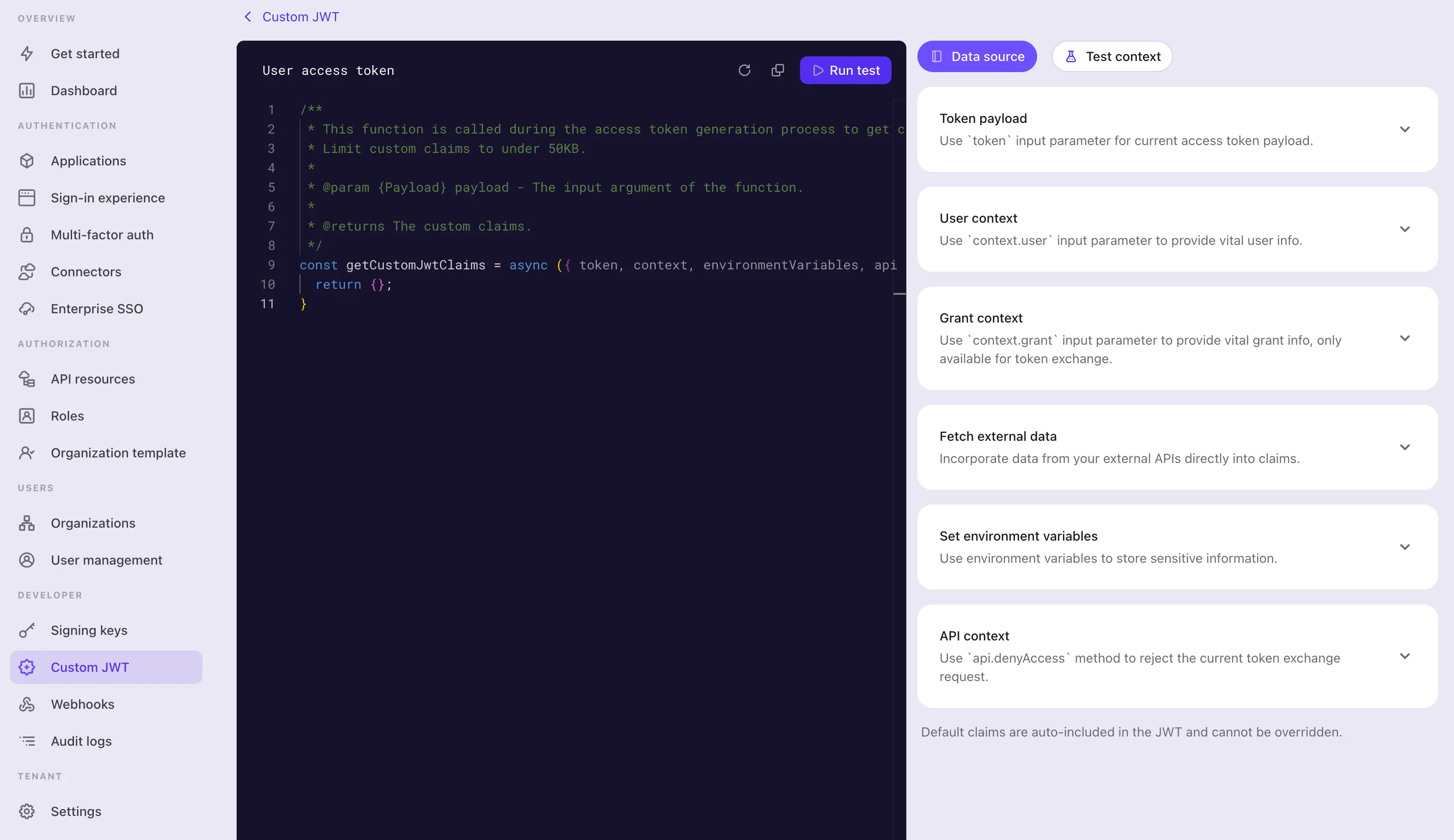
步驟 1:編輯腳本
使用左側的程式碼編輯器修改腳本。預設已提供一個回傳空物件的 getCustomJwtClaims,你可以修改此函式以回傳你自訂的宣告物件。
const getCustomJwtClaims = async ({ token, context, environmentVariables }) => {
  return {};
};
此編輯器使用 JavaScript 語言伺服器,提供基本語法高亮、程式碼補全與錯誤檢查。輸入參數皆有良好型別與 jsDoc 文件說明。你可以利用編輯器的 IntelliSense 正確存取輸入物件的屬性。詳細參數定義可於頁面右側查看。
此函式將作為模組匯出。請確保函式名稱維持為 getCustomJwtClaims,以便模組正確匯出該函式。
步驟 2:輸入參數
getCustomJwtClaims 函式接收一個物件作為輸入參數。該物件包含以下屬性:
token
權杖內容物件。此物件包含原始權杖宣告與你可能需要在腳本中存取的中繼資料。
你可以在頁面右側找到權杖內容物件與使用者資料物件的詳細型別定義。編輯器的 IntelliSense 也會協助你正確存取這些屬性。
- 使用者存取權杖資料物件
屬性 說明 型別 jtiJWT 唯一識別碼 stringaud權杖的受眾 (Audience) stringscope權杖的權限範圍 (Scopes) stringclientId權杖的用戶端 ID stringaccountId權杖的使用者 ID stringexpiresWithSession權杖是否隨工作階段到期 booleangrantId權杖的當前驗證 (Authentication) 授權 (Authorization) ID stringgty權杖的授權類型 stringkind權杖型態 AccessToken - 機器對機器存取權杖資料物件
屬性 說明 型別 jtiJWT 唯一識別碼 stringaud權杖的受眾 (Audience) stringscope權杖的權限範圍 (Scopes) stringclientId權杖的用戶端 ID stringkind權杖型態 ClientCredentials
context(僅適用於使用者存取權杖)
context 物件包含與當前授權 (Authorization) 流程相關的使用者資料與授權資料。
-
使用者資料物件 對於使用者存取權杖,Logto 提供額外的使用者資料 context 供你存取。該物件包含所有使用者個人資料與組織 (Organization) 成員資料,可用於設置自訂宣告。詳情請參閱 使用者 與 組織。
-
組織資料物件 對於組織存取權杖(針對特定組織請求的存取權杖),Logto 會透過
context.organization提供目標組織,讓你能附加每個組織專屬的宣告,例如將 Logto 組織 ID 映射到組織自訂資料中的內部 ID。此資料物件僅在權杖發給特定組織時存在,內容如下:屬性 說明 型別 id組織唯一識別碼 stringname組織名稱 stringdescription組織描述 string | nullcustomData組織自訂資料 Record<string, unknown>詳情請參閱 組織。
-
授權資料物件 對於經由模擬 (Impersonation) 權杖交換授予的使用者存取權杖,Logto 會提供額外的授權資料 context。該物件包含來自主體 (Subject) 權杖的自訂 context。詳情請參閱 使用者模擬 (User impersonation)。
-
使用者互動資料物件 對於特定使用者存取權杖,你可能需要存取當前授權 (Authorization) 工作階段的使用者互動細節。例如,你可能需要取得用於登入的企業級單一登入 (Enterprise SSO) 身分。此物件包含最近一次使用者提交的互動資料,包括:
屬性 說明 型別 interactionEvent當前使用者互動事件 SignIn或RegisteruserId當前使用者互動的使用者 ID stringverificationRecords使用者於互動過程中提交的驗證紀錄清單,用於識別與驗證身分。 VerificationRecord[]驗證紀錄型態:
// VerificationType.Password{id: string;type: 'Password';identifier: {type: 'username' | 'email' | 'phone' | 'userId';value: string;}verified: boolean;}// VerificationType.EmailVerificationCode{id: string;templateType: 'SignIn' | 'Register' | 'ForgotPassword' | 'Generic';verified: boolean;type: 'EmailVerificationCode';identifier: {type: 'email';value: string;}}// VerificationType.PhoneVerificationCode{id: string;templateType: 'SignIn' | 'Register' | 'ForgotPassword' | 'Generic';verified: boolean;type: 'PhoneVerificationCode';identifier: {type: 'phone';value: string;}}// VerificationType.Social{id: string;type: 'Social';connectorId: string;socialUserInfo?: {id: string;email?: string | undefined;phone?: string | undefined;name?: string | undefined;avatar?: string | undefined;rawData?: Record<string, unknown> | undefined;} | undefined;}// VerificationType.EnterpriseSso{id: string;type: 'EnterpriseSso';connectorId: string;enterpriseUserInfo?: {id: string;email?: string | undefined;phone?: string | undefined;name?: string | undefined;avatar?: string | undefined;[key: string]?: unknown;} | undefined;issuer?: string | undefined;}// VerificationType.Totp (MFA){id: string;type: 'Totp';userId: string;verified: boolean;}// VerificationType.WebAuthn (MFA){id: string;type: 'WebAuthn';userId: string;verified: boolean;}// VerificationType.BackupCode (MFA){id: string;type: "BackupCode";userId: string;code?: string | undefined;}// VerificationType.OneTimeToken{id: string;type: "OneTimeToken";verified: boolean;identifier: {type: "email";value: string;};oneTimeTokenContext?: {jitOrganizationIds?: string[] | undefined;} | undefined;}備註:使用者互動資料物件中可能包含多筆驗證紀錄,特別是當使用者經歷多次登入或註冊流程時。
例如,使用者先以
Social驗證紀錄登入,再透過EmailVerificationCode綁定新電子郵件,最後以Totp驗證紀錄驗證 MFA 狀態。此時,你可能需要在腳本中依序處理所有驗證紀錄。每種驗證紀錄型態在使用者互動資料物件中僅會出現一次。
environmentVariables
使用右側的 設定環境變數 (Set environment variables) 區塊為腳本設置環境變數。你可以利用這些變數儲存敏感資訊或設定資料,避免在腳本中硬編碼,例如 API 金鑰、密鑰或 URL。
所有你在此設置的環境變數都可於腳本中取得。請透過輸入參數的 environmentVariables 物件存取這些變數。
api
api 物件提供一組實用函式,讓你在腳本中對權杖發放流程進行額外存取控制。api 物件包含以下函式:
api.denyAccess(message?: string): void
api.denyAccess() 函式可讓你以自訂訊息拒絕權杖發放流程。你可以利用此函式於權杖發放流程中強制額外存取驗證。
執行時 API
自訂存取權杖腳本可在 Logto Cloud 與自架 Logto 中使用以下標準 Web API:
fetch、Request、Response與Headers- Web Crypto(透過
crypto與crypto.subtle) TextEncoder與TextDecoderURL與URLSearchParams
例如,你可以利用 Web Crypto 計算 SHA-256 與 HMAC-SHA-256:
const toHex = (buffer) =>
  [...new Uint8Array(buffer)].map((byte) => byte.toString(16).padStart(2, '0')).join('');

const sha256 = async (input) =>
  toHex(await crypto.subtle.digest('SHA-256', new TextEncoder().encode(input)));

const hmacSha256 = async (key, input) => {
  const encoder = new TextEncoder();
  const cryptoKey = await crypto.subtle.importKey(
    'raw',
    encoder.encode(key),
    { name: 'HMAC', hash: 'SHA-256' },
    false,
    ['sign']
  );

  return toHex(await crypto.subtle.sign('HMAC', cryptoKey, encoder.encode(input)));
};
腳本無法匯入套件。請避免使用 Node.js 專屬全域變數與模組,因為這些內容無法在自架 Logto 與 Logto Cloud 間移植,且不屬於支援的腳本契約範圍。
步驟 3:擷取外部資料
你可以在腳本中使用標準的 fetch 函式擷取外部資料。fetch 為基於 Promise 的函式,可讓你向外部 API 發送 HTTP 請求。
const getCustomJwtClaims = async ({ environmentVariables }) => {
  const response = await fetch('https://api.example.com/data', {
    headers: {
      Authorization: `Bearer ${environmentVariables.API_KEY}`,
    },
  });

  const data = await response.json();

  return {
    data,
  };
};
請注意,任何外部資料擷取都可能為權杖發放流程帶來延遲。請確保外部 API 可靠且足夠快速以符合你的需求。
此外:
- 請妥善處理腳本中的錯誤與逾時,避免權杖發放流程被阻塞。
- 使用適當的授權標頭保護你的外部 API,避免未授權存取。
步驟 4:測試腳本
請務必在儲存前測試你的腳本。點擊頁面右側的 測試 context (Test context) 分頁,修改測試用的權杖內容與使用者資料 context。
點擊編輯器右上角的 執行測試 (Run test),即可以測試資料執行腳本。腳本輸出將顯示於 測試結果 (Test Result) 抽屜中。
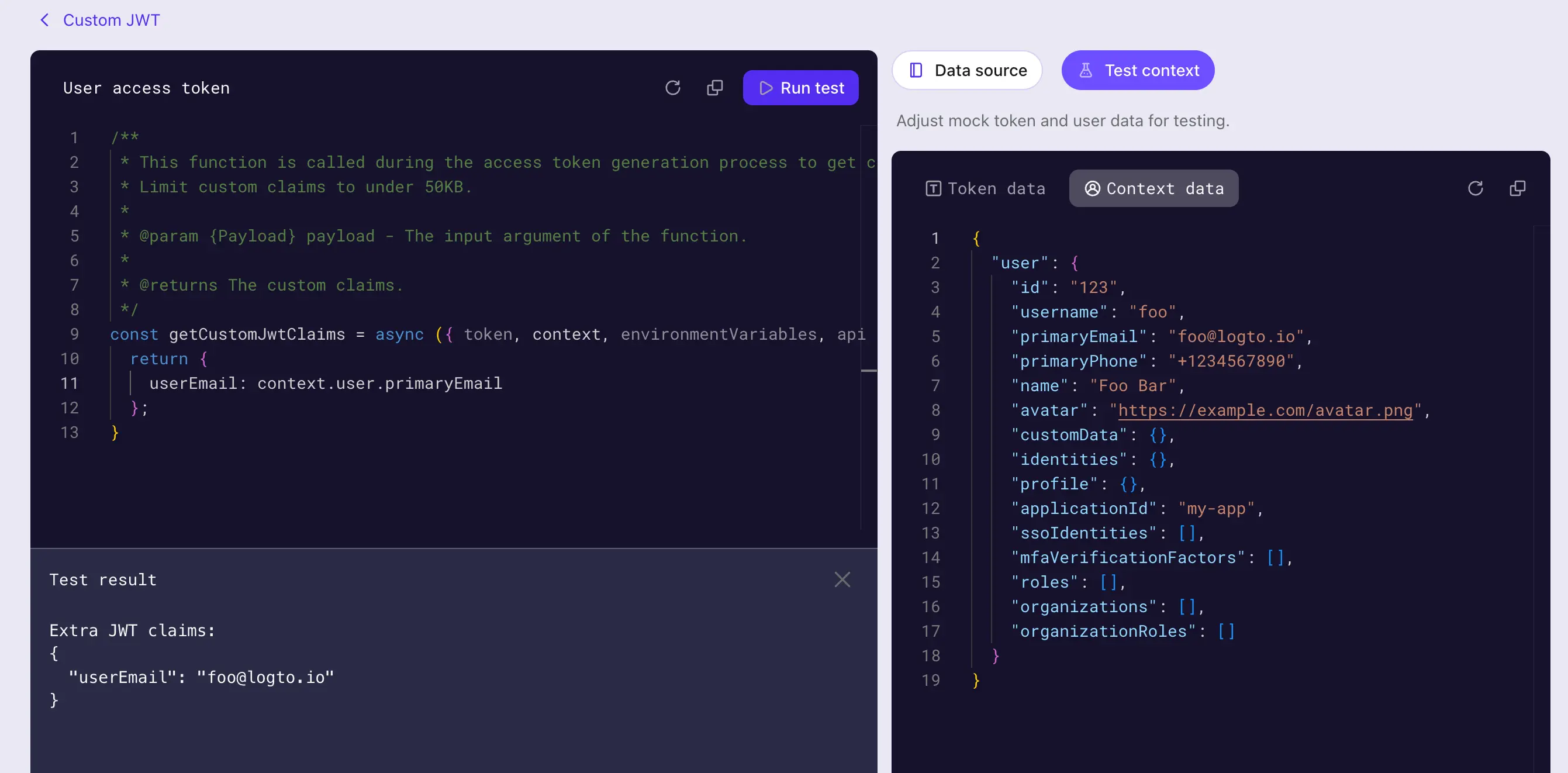
測試結果即為 getCustomJwtClaims 函式以你設定的測試資料執行後的輸出(即序列圖步驟 3 完成後取得的「額外權杖宣告」)。實際權杖內容與使用者資料 context 會依權杖發放流程而異。
點擊 建立 (Create) 按鈕以儲存腳本。自訂權杖宣告腳本將被儲存並應用於存取權杖發放流程。