为你的 iOS (Swift) 应用添加认证 (Authentication)
本指南假设你已经在管理控制台中创建了一个类型为“Native app”的应用程序。
安装
Logto Swift SDK 最低支持的 iOS 版本为 iOS 13。
Logto Swift SDK 有两个主要版本:
- v2:在
ASWebAuthenticationSession(系统浏览器)中打开登录体验,这样可以解锁密钥登录,并共享浏览器会话。注意,v2 移除了原生社交插件目标;社交连接器仍然通过浏览器工作。如果你依赖原生微信或支付宝 SDK 跳转,请继续使用 v1。 - v1:在嵌入式 WebView 中打开登录体验,这是原生社交插件目标所需的,但不支持密钥登录(WebView 不支持 WebAuthn,即密钥的底层标准)。
本指南涵盖了两个版本。请在下方标签中选择你的版本,选择将在本指南中保持同步。
使用以下 URL 在 Swift Package Manager 中添加 Logto SDK 作为依赖项。
https://github.com/logto-io/swift.git
自 Xcode 11 起,你可以直接导入 Swift 包,无需任何额外工具。
当 Xcode 询问包版本时,选择你想集成的版本:
- v2
- v1
使用最新的 v2 版本作为依赖。最新的 v2 版本为 2.0.0。
如果你直接使用 Package.swift:
.package(url: "https://github.com/logto-io/swift.git", from: "2.0.0")
如果你需要原生社交插件目标,请使用最新的 v1 版本。最新的 v1 版本为 1.2.0。
如果你直接使用 Package.swift:
.package(url: "https://github.com/logto-io/swift.git", from: "1.2.0")
由于一些技术原因,我们目前不支持 Carthage 和 CocoaPods。
Carthage
Carthage 需要一个 xcodeproj 文件来构建。我们会尝试后续寻找解决方案。
集成
初始化 LogtoClient
通过使用 LogtoConfig 对象创建一个 LogtoClient 实例来初始化客户端。
import Logto
import LogtoClient

let config = try? LogtoConfig(
  endpoint: "<your-logto-endpoint>", // 例如 http://localhost:3001
  appId: "<your-app-id>"
)
let client = LogtoClient(useConfig: config)
默认情况下,我们将 ID 令牌 (ID Token) 和刷新令牌 (Refresh Token) 等凭据存储在 Keychain 中。因此,当用户返回时,不需要再次登录。
要关闭此行为,请将 usingPersistStorage 设置为 false:
let config = try? LogtoConfig(
  // ...
  usingPersistStorage: false
)
实现登录和登出
在我们深入细节之前,下面是终端用户体验的快速概览。登录流程可以简化为如下:
- 你的应用调用登录方法。
- 用户被重定向到 Logto 登录页面。对于原生应用,会打开系统浏览器。
- 用户完成登录后被重定向回你的应用(配置为重定向 URI)。
关于基于重定向的登录
- 此认证 (Authentication) 过程遵循 OpenID Connect (OIDC) 协议,Logto 强制执行严格的安全措施以保护用户登录。
- 如果你有多个应用程序,可以使用相同的身份提供商 (IdP)(日志 (Logto))。一旦用户登录到一个应用程序,当用户访问另一个应用程序时,Logto 将自动完成登录过程。
要了解有关基于重定向的登录的原理和好处的更多信息,请参阅 Logto 登录体验解释。
配置重定向 URI
- v2
- v1
让我们切换到 Logto Console 的应用详情页面。添加一个重定向 URI io.logto.app://callback 并点击“保存更改”。
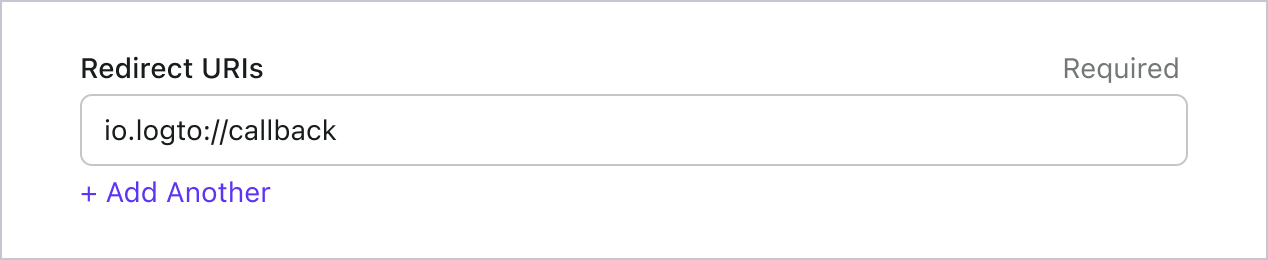
在 v2 中,登录体验会在 ASWebAuthenticationSession(系统浏览器)中打开,重定向会通过操作系统级别的回调匹配返回到你的应用。对于像 io.logto.app://callback 这样的自定义 scheme 重定向 URI,只需在应用的 Info.plist 中注册 scheme 部分(io.logto.app),然后将完整的重定向 URI 添加到 Logto 应用的 Redirect URIs 中。
在 Xcode 中,打开你的应用 target,选择 Info,展开 URL Types,并在 URL Schemes 中添加一项 io.logto.app。如果你直接编辑 Info.plist,请添加如下内容:
// 配置自定义 URL Scheme
<key>CFBundleURLTypes</key>
<array>
  <dict>
    <key>CFBundleTypeRole</key>
    <string>Editor</string>
    <key>CFBundleURLName</key>
    <string>io.logto.app</string>
    <key>CFBundleURLSchemes</key>
    <array>
      <string>io.logto.app</string>
    </array>
  </dict>
</array>
对于 v2 的浏览器流程,你无需调用 LogtoClient.handle(url:);该插件交接 API 已随内嵌 WebView 流程被移除。
使用 Universal Links 替代自定义 scheme?
你也可以使用 HTTPS 重定向 URI,例如 https://example.com/callback:
- 为你的应用添加 Associated Domains 能力。
- 配置
webcredentials:example.com,这样ASWebAuthenticationSession就能在 iOS 17.4 及更高版本上匹配 HTTPS 回调。 - 如果同一个 URL 还需要在认证 (Authentication) 会话外以 Universal Link 打开你的应用,配置
applinks:example.com并为该域名和路径托管有效的apple-app-site-association文件。 - 将 HTTPS URI 添加到 Logto 应用的 Redirect URIs。
- 将同样的 URI 传递给
signInWithBrowser。
在 iOS 17.4 及更高版本中,SDK 使用 ASWebAuthenticationSession 的 HTTPS 回调匹配 API,因此 HTTPS 重定向可以自动完成并关闭会话。在较旧的 iOS 版本中,授权 (Authorization) 请求仍可使用 HTTPS 重定向 URI,但会话可能不会自动关闭,除非你的应用自行处理 Universal Link 回调。如果你需要在旧版 iOS 上自动完成,建议保留自定义 scheme 重定向作为兼容选项。
让我们切换到 Logto Console 的应用详情页面。添加一个重定向 URI io.logto://callback 并点击“保存更改”。
iOS SDK 中的 Redirect URI 仅供内部使用。无需 添加 自定义 URL Scheme,除非连接器有要求。
登录与登出
在调用 .signInWithBrowser(redirectUri:) 之前,请确保你已在管理控制台中正确配置了重定向 URI。
- v2
- v1
在 v2 中,client.signOut(postLogoutRedirectUri:) 会执行完整的登出操作:清除本地凭据、撤销刷新令牌 (Refresh token),并通过系统浏览器打开结束会话端点来结束 Logto 会话。浏览器随后会通过登出后重定向 URI 返回你的应用。在使用前,请前往 Logto Console 的应用详情页,添加登出后重定向 URI io.logto.app://signed-out 并点击“保存更改”。登出后重定向 URI 可以使用你为登录注册的同一个自定义 scheme。
例如,在 SwiftUI 应用中:
// 示例:登录与登出流程
struct ContentView: View {
  @State var isAuthenticated: Bool

  private let redirectUri = "io.logto.app://callback"
  private let postLogoutRedirectUri = "io.logto.app://signed-out"

  init() {
    isAuthenticated = client.isAuthenticated
  }

  var body: some View {
    VStack {
      if isAuthenticated {
        Button("Sign Out") {
          Task { [self] in
            let error = await client.signOut(postLogoutRedirectUri: postLogoutRedirectUri)
            if let error = error {
              print(error)
              return
            }
            isAuthenticated = false
          }
        }
      } else {
        Button("Sign In") {
          Task { [self] in
            do {
              try await client.signInWithBrowser(redirectUri: redirectUri)
              isAuthenticated = true
            } catch let error as LogtoClientErrors.SignIn {
              // 登录过程中发生错误
            } catch {
              // 其他错误
            }
          }
        }
      }
    }
  }
}
- 你也可以直接调用
client.signOut(),无需传递登出后重定向 URI。这种情况下无需在 Console 配置:浏览器会显示 Logto 登出页面,用户可手动关闭页面返回应用。 - 如果没有 UI 上下文,你可以调用
client.clearCredentials()来清除本地凭据并撤销刷新令牌 (Refresh token)。注意,这会保留浏览器中的 Logto 会话,因此下次signInWithBrowser可能会通过该会话自动登录用户。
你可以使用 client.signInWithBrowser(redirectUri:) 进行用户登录,使用 client.signOut() 进行用户登出。
例如,在 SwiftUI 应用中:
// 示例:登录与登出流程
struct ContentView: View {
  @State var isAuthenticated: Bool

  init() {
    isAuthenticated = client.isAuthenticated
  }

  var body: some View {
    VStack {
      if isAuthenticated {
        Button("Sign Out") {
          Task { [self] in
            await client.signOut()
            isAuthenticated = false
          }
        }
      } else {
        Button("Sign In") {
          Task { [self] in
            do {
              try await client.signInWithBrowser(redirectUri: "io.logto://callback")
              isAuthenticated = true
            } catch let error as LogtoClientErrors.SignIn {
              // 登录过程中发生错误
            } catch {
              // 其他错误
            }
          }
        }
      }
    }
  }
}
检查点:测试你的应用程序
现在,你可以测试你的应用程序:
- 运行你的应用程序,你将看到登录按钮。
- 点击登录按钮,SDK 将初始化登录过程并将你重定向到 Logto 登录页面。
- 登录后,你将被重定向回你的应用程序,并看到登出按钮。
- 点击登出按钮以清除令牌存储并登出。
获取用户信息
显示用户信息
要显示用户的信息,你可以使用 client.getIdTokenClaims() 方法。例如,在一个 SwiftUI 应用中:
struct ContentView: View {
  @State var isAuthenticated: Bool
  @State var name: String?

  init() {
    isAuthenticated = client.isAuthenticated
    name = try? client.getIdTokenClaims().name
  }

  var body: some View {
    VStack {
      if isAuthenticated {
        Text("Welcome, \(name)")
      } else {
        Text("Please sign in")
      }
    }
  }
}
请求额外的声明 (Claims)
你可能会发现从 client.getIdTokenClaims() 返回的对象中缺少一些用户信息。这是因为 OAuth 2.0 和 OpenID Connect (OIDC) 的设计遵循最小权限原则 (PoLP),而 Logto 是基于这些标准构建的。
默认情况下,返回的声明(Claim)是有限的。如果你需要更多信息,可以请求额外的权限(Scope)以访问更多的声明(Claim)。
“声明(Claim)”是关于主体的断言;“权限(Scope)”是一组声明。在当前情况下,声明是关于用户的一条信息。
以下是权限(Scope)与声明(Claim)关系的非规范性示例:
“sub” 声明(Claim)表示“主体(Subject)”,即用户的唯一标识符(例如用户 ID)。
Logto SDK 将始终请求三个权限(Scope):openid、profile 和 offline_access。
要请求额外的权限 (Scopes),你可以将权限传递给 LogtoConfig 对象。例如:
let config = try? LogtoConfig(
  endpoint: "<your-logto-endpoint>", // 例如 http://localhost:3001
  appId: "<your-app-id>",
  scopes: [
    UserScope.Email.rawValue,
    UserScope.Phone.rawValue,
  ]
)
然后你可以在 client.getIdTokenClaims() 的返回值中访问额外的声明 (Claims):
let claims = try? client.getIdTokenClaims()
// 现在你可以访问额外的声明 `claims.email`,`claims.phone`,等。
需要网络请求的声明
为了防止 ID 令牌 (ID token) 过大,一些声明需要通过网络请求来获取。例如,即使在权限中请求了 custom_data 声明,它也不会包含在用户对象中。要访问这些声明,你可以使用 client.fetchUserInfo() 方法:
let userInfo = try? client.fetchUserInfo()
// 现在你可以访问声明 `userInfo.custom_data`
权限 (Scopes) 和声明 (Claims)
Logto 使用 OIDC 权限 (Scopes) 和声明 (Claims) 约定 来定义用于从 ID 令牌 (ID token) 和 OIDC userinfo 端点 获取用户信息的权限 (Scopes) 和声明 (Claims)。"scope" 和 "claim" 都是 OAuth 2.0 和 OpenID Connect (OIDC) 规范中的术语。
对于标准 OIDC 声明 (Claims),其在 ID 令牌 (ID token) 中的包含严格由所请求的权限 (Scopes) 决定。扩展声明 (Claims)(如 custom_data 和 organizations)可以通过 自定义 ID 令牌 (Custom ID token) 设置额外配置到 ID 令牌 (ID token) 中。
以下是支持的权限 (Scopes) 及其对应的声明 (Claims) 列表:
标准 OIDC 权限 (Scopes)
openid(默认)
| Claim name | Type | Description |
|---|---|---|
| sub | string | 用户的唯一标识符 |
profile(默认)
| Claim name | Type | Description |
|---|---|---|
| name | string | 用户的全名 |
| username | string | 用户名 |
| picture | string | 终端用户头像的 URL。该 URL 必须指向一个图片文件(例如 PNG、JPEG 或 GIF 图片文件),而不是包含图片的网页。请注意,该 URL 应专门指向适合在描述终端用户时显示的头像,而不是终端用户拍摄的任意照片。 |
| created_at | number | 终端用户创建的时间。该时间以自 Unix 纪元(1970-01-01T00:00:00Z)以来的毫秒数表示。 |
| updated_at | number | 终端用户信息最后更新时间。该时间以自 Unix 纪元(1970-01-01T00:00:00Z)以来的毫秒数表示。 |
其他 标准声明 (Claims) 包括 family_name、given_name、middle_name、nickname、preferred_username、profile、website、gender、birthdate、zoneinfo 和 locale 也会包含在 profile 权限 (Scope) 中,无需请求 userinfo 端点。与上表声明 (Claims) 不同的是,这些声明 (Claims) 仅在其值不为空时返回,而上表声明 (Claims) 的值为空时会返回 null。
与标准声明 (Claims) 不同,created_at 和 updated_at 声明 (Claims) 使用的是毫秒而不是秒。
email
| Claim name | Type | Description |
|---|---|---|
string | 用户的电子邮件地址 | |
| email_verified | boolean | 电子邮件地址是否已被验证 |
phone
| Claim name | Type | Description |
|---|---|---|
| phone_number | string | 用户的电话号码 |
| phone_number_verified | boolean | 电话号码是否已被验证 |
address
关于 address 声明 (Claim) 的详细信息,请参阅 OpenID Connect Core 1.0。
带有 (默认) 标记的权限 (Scopes) 总是由 Logto SDK 请求。当请求相应权限 (Scope) 时,标准 OIDC 权限 (Scopes) 下的声明 (Claims) 总是包含在 ID 令牌 (ID token) 中——无法关闭。
扩展权限 (Scopes)
以下权限 (Scopes) 由 Logto 扩展,并将通过 userinfo 端点 返回声明 (Claims)。这些声明 (Claims) 也可以通过 控制台 > 自定义 JWT 配置为直接包含在 ID 令牌 (ID token) 中。详见 自定义 ID 令牌 (ID token)。
custom_data
| Claim name | Type | Description | Included in ID token by default |
|---|---|---|---|
| custom_data | object | 用户的自定义数据 |
identities
| Claim name | Type | Description | Included in ID token by default |
|---|---|---|---|
| identities | object | 用户关联的身份 | |
| sso_identities | array | 用户关联的 SSO 身份 |
roles
| Claim name | Type | Description | Included in ID token by default |
|---|---|---|---|
| roles | string[] | 用户的角色 (Roles) | ✅ |
urn:logto:scope:organizations
| Claim name | Type | Description | Included in ID token by default |
|---|---|---|---|
| organizations | string[] | 用户所属的组织 (Organizations) ID | ✅ |
| organization_data | object[] | 用户所属的组织 (Organizations) 数据 |
这些组织 (Organizations) 声明 (Claims) 也可以在使用 不透明令牌 (Opaque token) 时通过 userinfo 端点获取。但不透明令牌 (Opaque tokens) 不能作为组织令牌 (Organization tokens) 用于访问组织专属资源。详见 不透明令牌 (Opaque token) 与组织 (Organizations)。
urn:logto:scope:organization_roles
| Claim name | Type | Description | Included in ID token by default |
|---|---|---|---|
| organization_roles | string[] | 用户所属组织 (Organizations) 的角色 (Roles),格式为 <organization_id>:<role_name> | ✅ |
API 资源
我们建议首先阅读 🔐 基于角色的访问控制 (RBAC),以了解 Logto RBAC 的基本概念以及如何正确设置 API 资源。
配置 Logto 客户端
一旦你设置了 API 资源,就可以在应用中配置 Logto 时添加它们:
let config = try? LogtoConfig(
  endpoint: "<your-logto-endpoint>", // 例如 http://localhost:3001
  appId: "<your-app-id>",
  resources: ["https://shopping.your-app.com/api", "https://store.your-app.com/api"], // 添加 API 资源 (API resources)
)
let client = LogtoClient(useConfig: config)
每个 API 资源都有其自己的权限(权限)。
例如,https://shopping.your-app.com/api 资源具有 shopping:read 和 shopping:write 权限,而 https://store.your-app.com/api 资源具有 store:read 和 store:write 权限。
要请求这些权限,你可以在应用中配置 Logto 时添加它们:
let config = try? LogtoConfig(
  endpoint: "<your-logto-endpoint>",
  appId: "<your-app-id>",
  scopes: ["shopping:read", "shopping:write", "store:read", "store:write"],
  resources: ["https://shopping.your-app.com/api", "https://store.your-app.com/api"],
)
let client = LogtoClient(useConfig: config)
你可能会注意到权限是与 API 资源分开定义的。这是因为 OAuth 2.0 的资源指示器 指定请求的最终权限将是所有目标服务中所有权限的笛卡尔积。
因此,在上述情况下,权限可以从 Logto 中的定义简化,两个 API 资源都可以拥有 read 和 write 权限,而无需前缀。然后,在 Logto 配置中:
let config = try? LogtoConfig(
  endpoint: "<your-logto-endpoint>",
  appId: "<your-app-id>",
  scopes: ["read", "write"],
  resources: ["https://shopping.your-app.com/api", "https://store.your-app.com/api"],
)
let client = LogtoClient(useConfig: config)
对于每个 API 资源,它将请求 read 和 write 权限。
请求 API 资源中未定义的权限是可以的。例如,即使 API 资源没有可用的 email 权限,你也可以请求 email 权限。不可用的权限将被安全地忽略。
成功登录后,Logto 将根据用户的角色向 API 资源发布适当的权限。
获取 API 资源的访问令牌 (Access token)
要获取特定 API 资源的访问令牌 (access token),你可以使用 getAccessToken 方法:
let accessToken = try await client.getAccessToken(for: "https://shopping.your-app.com/api")
此方法将返回一个 JWT 访问令牌 (access token),当用户具有相关权限时,可以用来访问 API 资源。如果当前缓存的访问令牌 (access token) 已过期,此方法将自动尝试使用刷新令牌 (refresh token) 获取新的访问令牌 (access token)。
将访问令牌附加到请求头
将令牌放在 HTTP 头的 Authorization 字段中,使用 Bearer 格式(Bearer YOUR_TOKEN),然后你就可以继续了。
Bearer 令牌的集成流程可能会根据你使用的框架或请求者而有所不同。选择你自己的方式来应用请求的 Authorization 头。
await LogtoRequest.get(
  useSession: session,
  endpoint: userInfoEndpoint,
  headers: ["Authorization": "Bearer \(accessToken)"]
)