保護組織層級 API 資源 (Organization-level API resources)
結合 API 資源 (API resources) 與組織範本 (organization template),可限制每個組織內的 API 與資料存取,確保你的 SaaS 具備租戶層級隔離。
什麼是組織層級 API 資源 (Organization-level API resources)?
組織層級 API 資源 (Organization-level API resources) 是你應用程式中限定於特定組織範圍的端點或服務。這些 API 會根據組織情境強制執行授權 (Authorization) 與存取,確保使用者或客戶端僅能存取與其組織相關的資料與操作。
常見應用情境包括
- 管理組織成員、角色或設定的 API(如
/organizations/{organizationId}/members) - 組織專屬的儀表板、分析或報表
- 綁定組織的帳單、訂閱或稽核端點
- 任何需依租戶隔離操作與資料的 API
Logto 允許你利用 OAuth 2.1 與 RBAC(角色型存取控制)保護這些組織 API,同時支援多租戶 SaaS 架構。
這些權限透過 組織範本 (organization template) 中定義的組織角色 (organization roles) 管理。每個組織都使用相同範本,確保所有組織的權限模型一致。
Logto 的運作方式
- API 資源與權限全域註冊: 每個 API 資源會在 Logto 以唯一資源標示符(URI)及一組權限(scopes)註冊。
- 組織層級角色: 組織角色於組織範本中定義。API 資源權限(scopes)指派給組織角色,再分配給每個組織內的使用者或客戶端。
- 情境感知授權 (Context-aware authorization): 當客戶端請求同時帶有 API 資源與
organization_id的存取權杖 (Access token) 時,Logto 會簽發同時包含組織情境與 API 受眾 (Audience) 的權杖。權杖的權限(scopes)由該使用者於指定組織的組織角色決定。 - 與全域資源分離: API 資源可帶或不帶組織情境存取。僅當請求中包含
organization_id時,才會套用組織 RBAC。若為所有使用者共用的 API,請參閱 保護全域 API 資源。
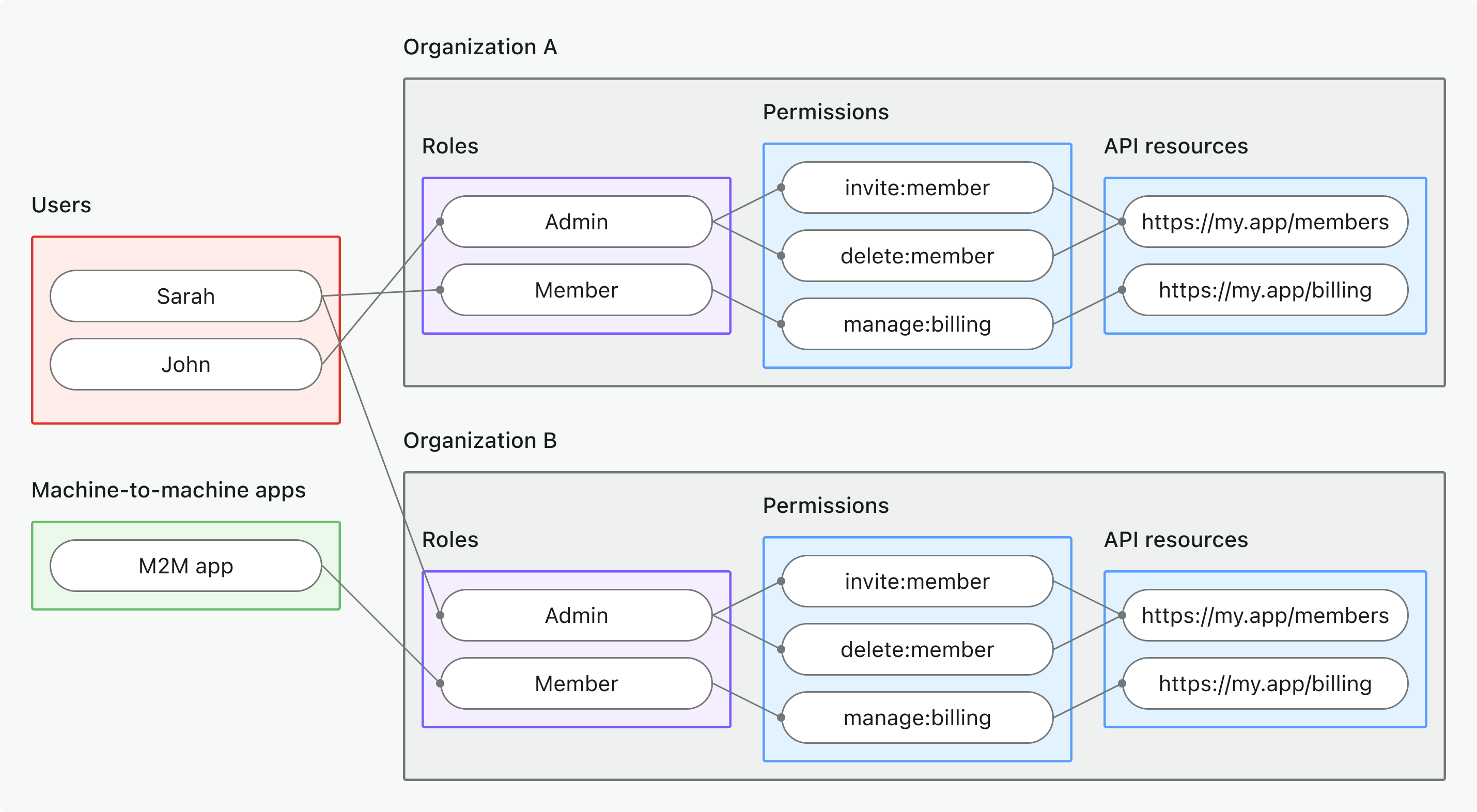
實作總覽
- 註冊你的 API 資源,並在 Logto 定義其權限(scopes)。
- 在組織範本中定義組織角色,並指派相關 API 權限。
- 將角色分配給每個組織內的使用者或客戶端。
- 請求帶有
organization_id的 API 存取權杖 (Access token),以納入組織情境。 - 在你的 API 驗證存取權杖,同時檢查組織情境與權限。
Logto 如何套用組織 RBAC
- 若請求存取權杖未帶
organization_id,僅會考慮全域角色/權限。 - 若請求存取權杖帶有
organization_id,Logto 會評估該使用者於該組織的組織角色及其對應權限。 - 最終產生的 JWT 會同時包含 API 受眾(
aud宣告 (Claim))與組織情境(organization_id宣告 (Claim)),且權限(scopes)僅限於該使用者組織角色所授予者。
授權流程:以組織情境驗證並保護 API
下列流程展示客戶端(Web、行動裝置或後端)如何取得並使用組織權杖 (Organization token) 存取組織層級 API 資源。
請注意,流程未詳列所有必要參數或標頭,僅聚焦於主要步驟。繼續閱讀可瞭解實際運作方式。
使用者驗證 = 瀏覽器/App。M2M = 使用客戶端憑證與組織情境的後端服務或腳本。
實作步驟
註冊你的 API 資源
- 前往 主控台 → API 資源。
- 建立新 API 資源(如
https://api.yourapp.com/org),並定義其權限(scopes)。
完整設定步驟請參閱 定義帶權限的 API 資源。
設定組織角色
- 前往 主控台 → 組織範本 → 組織角色。
- 建立組織角色(如
admin、member),並指派 API 權限給每個角色。 - 將角色分配給每個組織內的使用者或客戶端。若尚未成員,請先邀請或新增。
完整設定步驟請參閱 使用組織角色。
取得 API 資源的組織權杖 (Organization tokens)
你的客戶端/應用程式應同時帶上 resource 與 organization_id 參數來請求組織層級 API 的權杖。Logto 會以 JSON Web Token (JWT) 形式簽發組織權杖。你可透過 重新整理權杖流程 (refresh token flow) 或 客戶端憑證流程 (client credentials flow) 取得。
重新整理權杖流程 (Refresh token flow)
幾乎所有 Logto 官方 SDK 都原生支援以重新整理權杖流程取得組織權杖。標準 OAuth 2.0 / OIDC 客戶端函式庫也可實作此流程。
- Logto SDK
- OAuth 2.0 / OIDC client library
初始化 Logto SDK 時,請將 urn:logto:scope:organizations 及所需組織權限(scopes)加入 scopes 參數。
部分 Logto SDK 已預設組織權限範圍,例如 JavaScript SDK 的 UserScope.Organizations。
檢查 ID 權杖 (ID token) 中的 organizations 宣告 (claim),即可取得使用者所屬組織 (organization) ID 清單。此宣告會列出使用者所屬的所有組織,方便你在應用程式中列舉或切換組織。
呼叫 getAccessToken() 時,請同時指定 API 資源(resource)與組織 ID(organizationId)以取得組織權杖。
各 SDK 詳細用法請參閱 快速上手。
設定 OAuth 2.0 客戶端或初始化授權碼流程時,請確保包含下列參數:
resource:設為 Logto 註冊的 API 資源識別碼(如https://api.your-app.com/organizations)。scope:包含預設組織權限範圍(urn:logto:scope:organizations)、offline_access(取得重新整理權杖),以及所需 API 權限(如manage:members view:analytics)。
部分函式庫可能不原生支援 resource 參數,但通常可於授權請求中傳遞額外參數。詳情請查閱函式庫文件。
以下為授權請求的非正式範例:
GET /oidc/auth?response_type=code
&client_id=your-client-id
&redirect_uri=https://your-app.com/callback
&scope=openid profile offline_access urn:logto:scope:organizations invite:member manage:billing
&resource=https://api.your-app.com/organizations
&code_challenge=abc123
&code_challenge_method=S256
&state=xyz
HTTP/1.1
Host: your.logto.endpoint
使用者驗證後,你會收到授權碼。請用此授權碼向 Logto /oidc/token 端點發送 POST 請求。
以下為權杖請求的非正式範例:
POST /oidc/token HTTP/1.1
Host: your.logto.endpoint
Content-Type: application/x-www-form-urlencoded
Authorization: Basic base64(client_id:client_secret)

grant_type=authorization_code
&code=authorization-code-received
&redirect_uri=https://your-app.com/callback
目前,Logto 尚未支援直接透過授權碼流程(authorization code flow)取得組織權杖(Organization token)。你需要使用重新整理權杖(Refresh token)流程來獲取組織權杖(Organization token)。
你將收到可用於取得組織權杖的重新整理權杖。
檢查 ID 權杖 (ID token) 中的 organizations 宣告 (claim),即可取得使用者所屬組織 (organization) ID 清單。此宣告會列出使用者所屬的所有組織,方便你在應用程式中列舉或切換組織。
最後,使用重新整理權杖向 Logto /oidc/token 端點發送 POST 請求以取得組織權杖。請記得包含:
resource參數設為 API 資源識別碼(如https://api.yourapp.com/org)。organization_id參數設為目標組織 ID。- (可選)
scope參數可進一步縮限所需權限(如manage:members view:reports)。
以下為權杖請求的非正式範例:
POST /oidc/token HTTP/1.1
Host: your.logto.endpoint
Content-Type: application/x-www-form-urlencoded
Authorization: Basic base64(client_id:client_secret)

grant_type=refresh_token
&refresh_token=your-refresh-token
&resource=https://api.your-app.com/organizations
&organization_id=your-organization-id
客戶端憑證流程 (Client credentials flow)
針對機器對機器 (M2M) 情境,你可使用客戶端憑證流程取得組織層級 API 資源權限的存取權杖。只需向 Logto /oidc/token 端點發送帶有組織參數的 POST 請求,即可用你的客戶端 ID 與密鑰請求組織權杖。
請在請求中包含以下主要參數:
resource:API 資源識別碼(如https://api.yourapp.com/org)。organization_id:欲取得權杖的組織 ID。scope:欲請求的組織層級 API 資源權限(如invite:member、manage:billing)。
以下為使用 client credentials grant type 的權杖請求非正式範例:
POST /oidc/token HTTP/1.1
Host: your.logto.endpoint
Content-Type: application/x-www-form-urlencoded
Authorization: Basic base64(client_id:client_secret)

grant_type=client_credentials
&resource=https://api.yourapp.com/org
&organization_id=your-organization-id
&scope=invite:member manage:billing
驗證組織權杖 (Organization tokens)
Logto 簽發的組織權杖(JWT)包含可供你的 API 強制執行組織層級存取控制的宣告 (Claims)。
當你的應用程式收到組織權杖時,應:
- 驗證權杖簽章(使用 Logto 的 JWKs)。
- 確認權杖未過期(
exp宣告)。 - 檢查
iss(簽發者 (Issuer))是否為你的 Logto 端點。 - 確認
aud(受眾 (Audience))是否為你註冊的 API 資源識別碼(如https://api.yourapp.com/org)。 - 驗證
organization_id宣告,確保權杖限定於正確組織。 - 拆解
scope宣告(以空格分隔),檢查所需權限。 - 若 API 路徑包含組織 ID(如
/organizations/{organizationId}/members),請確保organization_id宣告與路徑參數一致。
逐步與語言專屬教學請參閱 如何驗證存取權杖。
Optional: Handle user permission change
User permissions can change at any time. Because Logto issues JWTs for RBAC, permission updates only appear in newly issued tokens, and never modify existing JWTs.
An access token can only include scopes that were requested in the original OAuth authorization flow. Even if a user gains new permissions, the token issued later can only contain a subset of the originally requested scopes. To access newly granted scopes that were not part of the initial request, the client must run a new authorization flow.
Downscoped permissions
When a user loses permissions:
- Newly issued tokens immediately reflect the reduced scopes.
- Existing JWTs keep the old scopes until they expire.
- Your API should always validate scopes and rely on short token lifetimes.
If you need faster reactions, implement your own signal that tells clients to refresh their tokens.
Enlarged permissions
For organization tokens, when a user gains permissions, enlarged permissions will show up on the next issuance (refresh or token request). A new token is still required, but no full re-auth is needed unless the new scopes exceed the original request set.
Recommendations
- Validate scopes in your API on every call.
- Keep token expiration short.
- Add optional notifications if you need immediate permission-change propagation.
最佳實踐與安全建議
- 務必驗證組織情境: 不要只信任權杖,對每個組織範圍 API 呼叫都要檢查
organization_id宣告。 - 使用受眾限制: 務必檢查
aud宣告,確保權杖僅用於指定組織。 - 權限設計以業務為導向: 權限名稱應清楚對應實際操作,每個組織角色僅授予必要權限。
- 盡可能區分 API 與非 API 權限(但兩者可同屬一個角色)。
- 縮短權杖存活時間: 若權杖外洩可降低風險。
- 定期檢視組織範本: 隨產品演進更新角色與權限。
常見問題
若權杖請求未帶 organization_id 會怎樣?
organization_id 會怎樣?僅會評估全域角色/權限,不會套用組織 RBAC。
可以在同一角色混用組織與非組織權限嗎?
不行,組織權限(包含組織層級 API 權限)由組織範本定義,不能與全域 API 權限混用。但你可以建立同時包含組織權限與組織層級 API 權限的角色。
延伸閱讀
如何驗證存取權杖 自訂權杖宣告 (Claims)實例:打造多租戶 SaaS 應用程式
RFC 8707:資源標示符 (Resource Indicators)